We Develop Active Global Citizens
The world needs more Active Global Citizens. AFS helps to create them.
Learn more about AFS
Connect with our global community—1 million strong

-

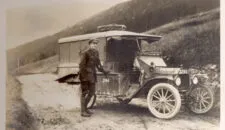
The Untold Stories of WWI AFS Drivers with UPenn Lecturer Lisa Ann Britton
Before AFS was a global exchange organization, it was a volunteer ambulance corps on the front lines of World War… -
AFS Intercultural Programs and Soliya Join Forces to Strengthen and Expand Global Intercultural Education
Two leading international organizations, AFS Intercultural Programs and Soliya, today announced that Soliya is now a non-profit subsidiary of AFS,… -
The Heart of AFS: Volunteers Have the Power to Build a Better World
Closing Remarks of Ernesto ReyMoreno, Chair of the AFS International Board of Trustees, at the AFS Chapter Leadership Summit in…

-
Core Insights from AFS’s 2025 International Education Week
From November 17-21, 2025, AFS Intercultural Programs convened global experts, educators, and youth from around the world for our annual… -
AFS Welcomes New International Board of Trustees Members
The AFS Board of Trustees is excited to welcome three new members: Wendy Kuran (Associate Vice President for Development and… -
Shaping the Global Dialogue: AFS Joins the NGO-UNESCO Liaison Committee
We are proud to announce that Maria Clara Almeida, Board Chair of AFS Intercultura Brasil, is officially representing AFS in…